Understanding the verizon unlock policy is crucial if you want the freedom to switch carriers, travel abroad, or sell your device.
In 2026, the mobile landscape continues to evolve, with eSIM technology taking center stage. However, carrier locks remain a reality that many smartphone users must navigate.
Whether you have recently purchased an iPhone, a Samsung Galaxy, or a Google Pixel, knowing exactly when and how Verizon removes network restrictions saves you time and money.
This comprehensive guide breaks down the rules, timelines, and technical requirements needed to free your smartphone from network limitations.
Contents
What is a Carrier Lock?
A carrier lock is a software restriction placed on a mobile device by a wireless provider. This software prevents the phone from connecting to unauthorized cellular networks.
Providers implement these locks to mitigate theft and prevent fraud. It also ensures that subsidized devices remain on their network long enough to recoup hardware costs.
When a device is locked to Verizon, it will display a “SIM Not Supported” or “Network Locked” error if you insert a SIM card from T-Mobile, AT&T, or international carriers.
Once the lock is removed, the device becomes “unlocked,” meaning it can communicate with any compatible cell tower globally.
The Standard 60-Day Unlock Rule
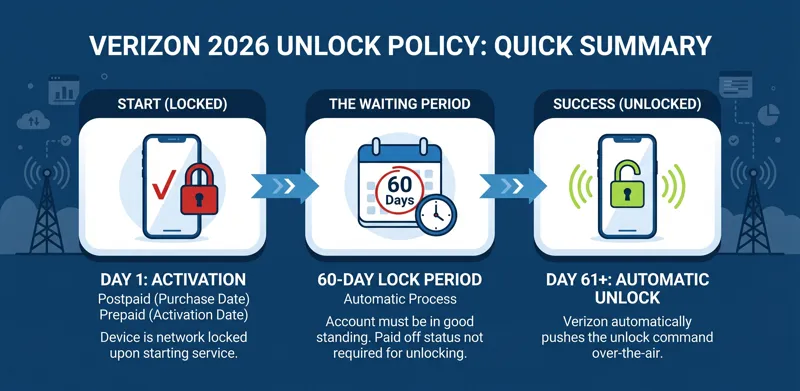
The core of the Verizon network policy is the automatic 60-day unlock rule. This applies to almost all modern consumer devices.
If you purchase a device from Verizon or an authorized retail partner, it is locked to the Verizon network upon activation.
Exactly 60 days after the date of purchase (or the activation date for devices bought elsewhere), Verizon automatically removes the lock.
This process happens over-the-air. You do not need to call customer service or enter a special code, provided your device has an active internet connection.
Conditions for the Automatic Unlock
While the 60-day rule is standard, certain conditions must be met for the automatic unlock to trigger successfully.
First, the device must not be flagged as lost, stolen, or involved in fraudulent activity. Verizon strictly monitors device IMEI numbers across a global database.
Second, the account associated with the device must be in good standing. If the account is suspended for non-payment, the unlock process may be halted.
Interestingly, paying off your device installment plan early does not bypass the 60-day waiting period. The device must still remain active for the full two months.
Postpaid vs. Prepaid Policies
Verizon offers both postpaid (monthly billing) and prepaid (pay-in-advance) services. The unlocking rules vary slightly depending on your service type.
For postpaid customers, the 60-day timer begins on the exact date of purchase. As long as there is no fraud alert, the phone unlocks automatically.
For prepaid customers, the device is also locked for 60 days. However, the timer typically begins on the date of activation, not necessarily the date of purchase.
If you buy a Verizon “Phone in a Box” from a retailer like Walmart or Target, you must activate it on the Verizon network to start the 60-day countdown.
| Plan Type | Unlock Timeframe | Key Requirement | Method |
|---|---|---|---|
| Postpaid | 60 Days from Purchase | No fraud history, account in good standing | Automatic / Over-the-air |
| Prepaid | 60 Days from Activation | Must activate on a prepaid line | Automatic / Over-the-air |
Exceptions to the Rule: Military Personnel
Verizon provides special considerations for active-duty military personnel who receive deployment orders outside the Verizon coverage area.
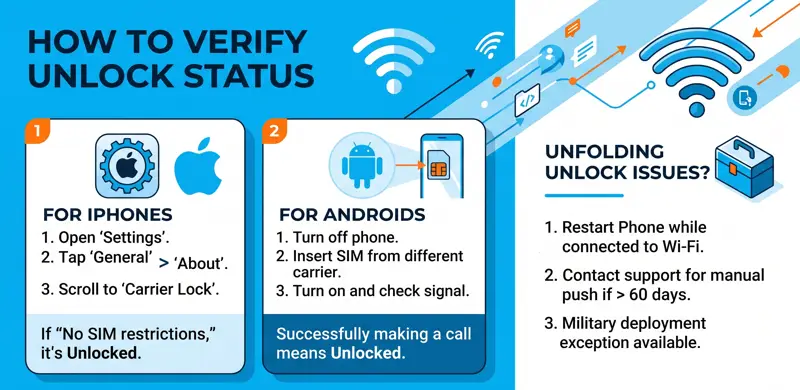
If you are deployed before the 60-day period expires, Verizon will unlock your device early so you can use local SIM cards abroad.
To request a military unlock, you must contact Verizon customer support and provide a copy of your official deployment orders.
This exception is legally supported by the Servicemembers Civil Relief Act (SCRA) and showcases a commitment to supporting the armed forces.
“A fully unlocked device offers the ultimate freedom, allowing consumers to switch carriers effortlessly and travel internationally without restrictive roaming fees.”
How to Check if Your Device is Unlocked
Before traveling or attempting to switch carriers, you should verify that your phone is successfully unlocked.
The easiest method is to insert a SIM card from a different carrier into your phone. If you get a signal and can make a call, your phone is unlocked.
If you don’t have another SIM card, you can check within your device’s software settings.
Checking Unlock Status on iPhone
Apple has made it incredibly easy to check carrier lock status directly within iOS.
Open your Settings app, tap on “General,” and then select “About.”
Scroll down to the “Carrier Lock” or “Network Provider Lock” section. If it says “No SIM restrictions,” your device is fully unlocked.
Checking Unlock Status on Android
Android devices vary slightly by manufacturer, but the general process remains similar across Samsung, Google, and Motorola devices.
Go to your Settings menu, navigate to “Network & Internet” or “Connections,” and look for “Mobile Networks.”
Some Android phones have a specific “Network Unlock” status page in the “About Phone” section. If you can manually search for and select other networks, your phone is likely unlocked.
The Role of eSIMs in 2026
By 2026, physical SIM cards have largely been replaced by eSIM (embedded SIM) technology in flagship smartphones.
eSIMs allow users to download carrier profiles digitally without inserting a physical card. However, carrier locks still apply to eSIM hardware.
If your device is locked to Verizon, you will receive an error message when attempting to scan a QR code or download an eSIM profile from another provider.
Once the 60-day period ends, the restriction is lifted from the eSIM module, allowing you to store multiple international or domestic profiles simultaneously.
Troubleshooting Common Unlock Issues
While the automatic process is usually seamless, technical glitches can occasionally prevent a device from unlocking.
If 60 days have passed and your phone remains locked, the first step is to reboot your device while connected to Wi-Fi. This forces the phone to check in with Verizon’s servers.
If you are using an iPhone, you may also need to back up your device, erase it completely, and restore it from the backup to trigger the Apple activation servers to update your status.
If these steps fail, you must contact Verizon’s customer care team. Provide them with your device’s IMEI number so they can manually push the unlock command.
| Common Error | Possible Cause | Troubleshooting Step |
|---|---|---|
| SIM Not Supported | Device is still under the 60-day lock period. | Check the purchase date. Wait until day 61. |
| No Service (New SIM) | Software glitch preventing the unlock from registering. | Connect to Wi-Fi and restart the device. |
| eSIM Profile Fails | Carrier lock blocking the download of secondary profiles. | Verify unlock status in settings, contact support if locked. |
Buying and Selling Used Verizon Phones
The secondary smartphone market is massive in 2026. Understanding the unlock policy is vital when buying or selling used hardware.
If you are buying a used Verizon phone, always ask the seller for the IMEI number to verify its status before completing the transaction.
A phone that has not completed its 60-day tenure will remain locked, and you will be unable to use it on T-Mobile or AT&T.
Furthermore, if the original owner reports the phone lost or stops paying their Verizon bill, the phone could be blacklisted, rendering it useless on any network.
Selling an unlocked phone generally yields a higher resale value, as it appeals to a broader audience of buyers across different carriers.
International Travel and Network Freedom
One of the primary reasons users seek to unlock their phones is for international travel.
While Verizon offers comprehensive roaming packages like TravelPass, these daily fees can accumulate quickly during extended trips abroad.
By unlocking your device, you can purchase local prepaid eSIMs or physical SIMs in your destination country at a fraction of the cost.
You can even keep your Verizon eSIM active for Wi-Fi calling and text messages while using the local data network for internet access.
“Always verify your device’s network compatibility before attempting an unlock, as hardware limitations can still restrict performance on other carriers.”
Regulatory Compliance and the FCC
The policies established by Verizon are closely monitored by the Federal Communications Commission (FCC) to ensure consumer protection.
Carriers are required by law to clearly disclose their unlocking policies and provide straightforward methods for consumers to free their devices once contractual obligations are met.
Verizon’s shift to a 60-day lock was actually a compromise approved by regulators to help combat a severe rise in organized retail theft of smartphones.
For more detailed information on consumer rights regarding cellular networks, you can review the official guidelines provided by federal authorities.
Read more on the FCC Guidelines on Cell Phone Unlocking.
Conclusion
Navigating network restrictions doesn’t have to be a headache. By understanding the 60-day rule, you can easily manage your mobile devices.
Whether you are on a postpaid or prepaid plan, the automated system designed for 2026 ensures a mostly frictionless experience.
Always verify your device’s status before traveling, and remember to connect to Wi-Fi to allow over-the-air updates to process smoothly.
You may also like: 128 T-Mobile Text: Decoding the Mystery and Understanding Its Implications
Frequently Asked Questions
Does paying off my phone early unlock it immediately?
No. Even if you pay off the device balance entirely on day 10, you must still wait the full 60 days for the automatic unlock to process.
Do I need to call Verizon to unlock my phone?
Generally, no. The unlock process is automatic over-the-air after 60 days. You only need to call if you experience a technical error or are requesting a military exception.
Will an unlocked Verizon phone work on any network?
An unlocked phone will accept any SIM, but it still requires the correct hardware antennas. Most 2026 smartphones are universally compatible with major global networks.
Can a blacklisted phone be unlocked?
No. If a device is reported lost, stolen, or tied to severe fraud, Verizon will blacklist the IMEI, preventing it from working on any network regardless of unlock status.
How does the policy apply to tablets and smartwatches?
Verizon generally does not lock 4G/5G tablets or smartwatches. The 60-day lock policy primarily targets smartphones.
What if I bought my Verizon phone from Apple or Best Buy?
If you bought the phone from a third-party retailer but activated it on Verizon billing, the standard 60-day lock policy still applies from the date of activation.
Is it legal to use third-party unlocking software?
While the FCC allows consumers to unlock their phones, using unauthorized third-party hacking tools can void your warranty and permanently damage your device’s software.
Disclaimer: This article is for informational purposes only. Carrier policies are subject to change without notice. Always consult Verizon’s official documentation or customer support for the most current information regarding your specific account and device.