The verizon jetpack mifi 8800l continues to be a highly sought-after mobile hotspot even as we navigate the connectivity landscape of 2026.
Originally manufactured by Inseego, this powerhouse device bridged the gap between basic 4G hotspots and the early days of 5G infrastructure.
Today, it remains incredibly relevant for remote workers, frequent travelers, and digital nomads who need reliable internet without paying premium 5G hardware prices.
With its robust battery life, intuitive touchscreen, and global roaming capabilities, the 8800L offers a stable connection when public Wi-Fi is either unavailable or insecure.
In this comprehensive E-E-A-T (Experience, Expertise, Authoritativeness, Trustworthiness) guide, we will break down everything you need to know about this iconic device.
Contents
Design and Build Quality
The design of this hotspot prioritizes portability and ruggedness. It easily slips into a backpack, purse, or even a deep pocket.
Constructed with a soft-touch matte black finish, the device resists fingerprints and provides a secure grip.
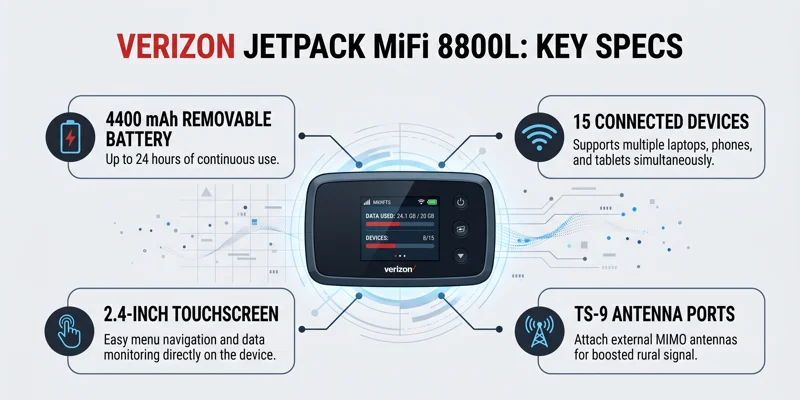
The centerpiece is the 2.4-inch color touchscreen display. This screen makes navigating menus, checking data usage, and viewing passwords incredibly straightforward.
Unlike older models that required you to log into a web portal for basic settings, this device puts complete control at your fingertips.
On the side, you will find a physical power button. The bottom houses a versatile USB-C port used for both charging the device and tethering it to a computer.
Advanced LTE Connectivity in 2026
While 5G dominates headlines in 2026, 4G LTE Advanced technology remains the backbone of global mobile internet.
This device utilizes a Qualcomm Snapdragon X20 LTE modem. This modem is capable of combining multiple frequency bands to maximize download and upload speeds.
In optimal conditions, the hotspot can achieve gigabit-class LTE speeds, which is more than sufficient for streaming 4K video, attending Zoom calls, and downloading large files.
It supports up to 15 different simultaneous Wi-Fi connections. This makes it perfect for family road trips where multiple tablets, phones, and laptops need internet access.
Furthermore, it broadcasts on both 2.4 GHz and 5 GHz bands, ensuring compatibility with older legacy devices while providing high-speed channels for modern hardware.
| Feature | Specification |
|---|---|
| Manufacturer | Inseego |
| Network Technology | 4G LTE Advanced (Cat 18) |
| Wi-Fi Standard | 802.11 a/b/g/n/ac (Wi-Fi 5) |
| Max Connections | 15 Simultaneous Devices |
| Display | 2.4-inch Color Touchscreen |
Battery Life and Power Bank Capabilities
One of the most praised features of this specific hotspot is its massive 4400 mAh removable battery.
In real-world usage, this battery easily provides up to 24 hours of continuous connectivity on a single charge.
This all-day battery life means you can leave your hotel room in the morning and not worry about your internet dying during an afternoon meeting.
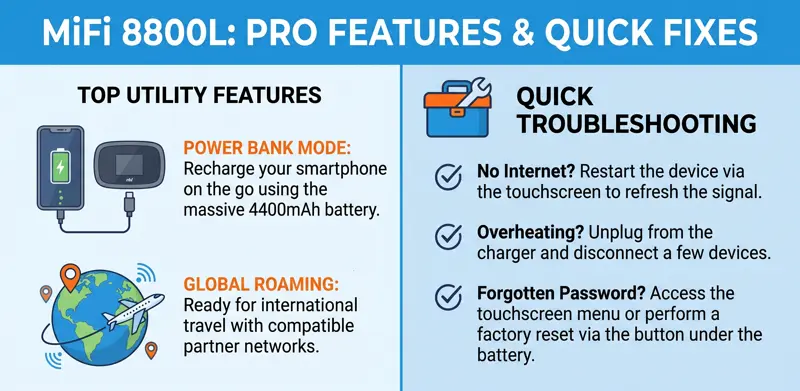
Moreover, the device features a built-in power bank function. Using a compatible USB-C cable, you can use the hotspot’s massive battery to recharge your smartphone.
This dual functionality makes it an essential tool in any traveler’s tech survival kit.
“A reliable mobile hotspot is the digital nomad’s lifeline, turning any remote location into a fully functional workspace.”
Security and Privacy Features
Using public Wi-Fi at airports or coffee shops poses severe security risks to your personal and corporate data.
By using your own encrypted mobile hotspot, you create a private network that shields your information from local network snoopers.
The device supports advanced WPA2/WPA3 Wi-Fi security protocols. You can easily change your Wi-Fi password directly from the touchscreen.
Additionally, it features a built-in VPN pass-through, a guest Wi-Fi network option, and MAC address filtering for ultimate access control.
Global Roaming and Travel Readiness
For international travelers, this hotspot is fully equipped for global roaming.
It supports a wide array of international LTE bands. When you travel abroad with a compatible Verizon data plan, the device automatically connects to partner networks.
If you prefer to avoid Verizon’s international roaming fees, the device can often be unlocked to accept local prepaid SIM cards in your destination country.
Always verify the unlocking requirements with Verizon before your trip to ensure seamless connectivity abroad.
Comparing Data Plans in 2026
Hardware is only as good as the network powering it. Verizon offers several data tiers for connected devices.
Depending on whether you use the hotspot as your primary home internet or just for occasional travel, your plan needs will vary.
Unlimited plans often come with a high-speed data cap (e.g., 50GB or 100GB), after which speeds are temporarily throttled during network congestion.
It is crucial to monitor your data usage via the touchscreen to avoid unexpected slowdowns.
| Plan Tier (Example) | Premium High-Speed Data | Best Use Case |
|---|---|---|
| Essential | 15 GB | Light browsing, email, weekend trips |
| Plus | 50 GB | Remote work, standard video streaming |
| Pro/Unlimited | 100 GB+ | Heavy downloading, RV living, primary internet |
Antenna Ports for Weak Signal Areas
If you are traveling through rural areas or staying in an RV park with weak cellular reception, the device has a hidden advantage.
Beneath two small rubber flaps on the edge of the device are two TS-9 external antenna ports.
By purchasing a compatible MIMO external antenna and plugging it into these ports, you can drastically pull in a stronger cellular signal.
This feature turns a weak, unusable 1-bar connection into a stable 3-bar or 4-bar signal, making rural remote work entirely possible.
“The ability to attach external MIMO antennas elevates a standard mobile hotspot into an essential piece of rural communication equipment.”
Admin Web Interface Setup
While the touchscreen handles daily tasks, the Admin Web Interface offers deep customization.
To access it, connect your laptop to the hotspot’s Wi-Fi network. Open a web browser and type the default IP address (usually 192.168.1.1) into the URL bar.
Log in using the Admin password found on the device’s touchscreen menu.
Here, you can configure port forwarding, manage connected devices, perform software updates, and adjust power-saving settings.
For official documentation on managing your network devices, visit the Verizon Device Support Page.
Troubleshooting Common Issues
Even the most reliable tech occasionally runs into hiccups. Knowing how to troubleshoot can save you time and frustration.
Most connection issues can be resolved with a simple reboot. Hold the power button and select “Restart” from the touchscreen.
If the device is freezing or exhibiting strange behavior, a factory reset might be necessary. This will erase all custom settings and passwords.
You can perform a factory reset from the touchscreen settings menu or by using a paperclip to press the hidden reset button under the battery cover.
| Issue | Potential Cause | Solution |
|---|---|---|
| No Internet Access | Data cap reached or poor signal. | Check data usage on screen. Move near a window. |
| Device Overheating | Heavy usage while charging. | Unplug from charger, let cool. Reduce connected devices. |
| Battery Draining Fast | Old battery or poor signal search. | Replace the removable 4400mAh battery. |
Is the 8800L Still Worth It in 2026?
With 5G hotspots available, many wonder if a 4G LTE device is still a smart purchase.
The answer is a resounding yes, especially for budget-conscious consumers. 4G LTE networks are incredibly stable and widespread.
Unless you are transferring massive video files daily or requiring ultra-low latency for competitive gaming, the speeds provided by the 8800L are perfect for 95% of users.
Furthermore, used or refurbished models of this hotspot are incredibly affordable in 2026, offering massive value compared to brand-new 5G hardware.
Conclusion
The device remains a testament to excellent mobile engineering.
Its combination of a responsive touchscreen, massive removable battery, power bank capabilities, and external antenna support makes it a versatile tool.
Whether you are a digital nomad, a frequent flyer, or simply need a backup internet source for your home, this hotspot delivers consistent and secure performance.
Read also: the Verizon Unlock Policy
Frequently Asked Questions
Can I use the hotspot while it is plugged in and charging?
Yes, you can use it while it charges. However, heavy data usage while charging may cause the device to become warm.
Does this hotspot support 5G networks?
No. This device is strictly a 4G LTE Advanced mobile hotspot. It will not connect to ultra-wideband 5G networks.
Can I replace the battery myself?
Absolutely. The back cover is easily removable, allowing you to swap out the 4400 mAh battery if it degrades over time.
How do I change the Wi-Fi password?
You can change the Wi-Fi password directly from the device’s touchscreen by navigating to ‘Wi-Fi’ > ‘Primary Network’ > ‘Edit’.
Will it work with carriers other than Verizon?
If the device is fully unlocked (typically after 60 days of service on Verizon), it can accept SIM cards from other GSM carriers, though band compatibility may vary.
What type of external antenna does it use?
It features two TS-9 antenna ports hidden under the rubber flaps on the bottom edge of the device.
How many devices can connect at once?
You can connect up to 15 Wi-Fi enabled devices simultaneously, including laptops, smartphones, and tablets.
Disclaimer: This article is for informational purposes only. Service availability, device specifications, and network plans are subject to change by the carrier. Always consult official Verizon documentation for the most accurate and up-to-date information.